Lecture 9
Virtual Memory
Lecture
Outline
- Virtual memory and physical memory
- Virtual and physical addresses
- Address translation and page table
- Translation lookaside buffer (TLB)
Examples
Address sizes for various real CPUs:
Architecture:             x86_64
CPU op-mode(s):           32-bit, 64-bit
Address sizes:            48 bits physical, 48 bits virtual
Byte Order:               Little Endian
CPU(s):                   24
On-line CPU(s) list:      0-23
Vendor ID:                AuthenticAMD
Model name:               AMD Ryzen AI 9 HX 370 w/ Radeon 890M
Architecture:             x86_64
  CPU op-mode(s):         32-bit, 64-bit
  Address sizes:          46 bits physical, 48 bits virtual
  Byte Order:             Little Endian
CPU(s):                   24
  On-line CPU(s) list:    0-23
Vendor ID:                GenuineIntel
  Model name:             13th Gen Intel(R) Core(TM) i7-13700
Architecture:             x86_64
  CPU op-mode(s):         32-bit, 64-bit
  Address sizes:          39 bits physical, 48 bits virtual
  Byte Order:             Little Endian
CPU(s):                   16
  On-line CPU(s) list:    0-15
Vendor ID:                GenuineIntel
  Model name:             12th Gen Intel(R) Core(TM) i7-1260P
Architecture:             x86_64
  CPU op-mode(s):         32-bit, 64-bit
  Address sizes:          39 bits physical, 48 bits virtual
  Byte Order:             Little Endian
CPU(s):                   8
  On-line CPU(s) list:    0-7
Vendor ID:                GenuineIntel
  Model name:             Intel(R) Core(TM) i7-8665U CPU @ 1.90GHz
Modern CPUs are typically limited to 48-bit virtual addresses because this is more
than enough for modern data volumes (2**48 = 256 TB). Using 48 bits
rather than 64 simplifies hardware (smaller cache tags and TLBs) and page tables.
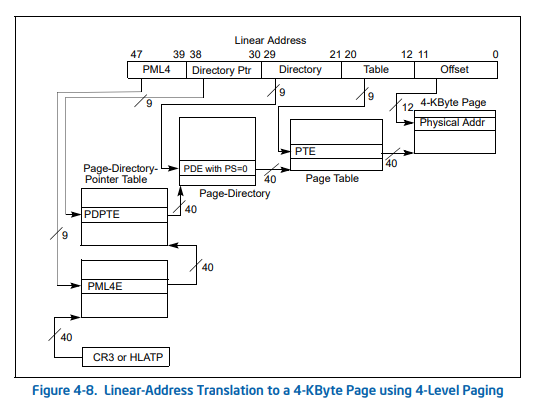
Multi-level page tables (Intel)
4-level paging:
5-level paging:
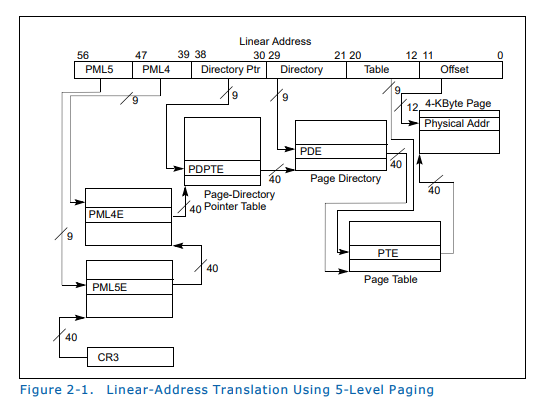
How to known which paging option is enabled in Linux kernel?
cat /boot/config-$(uname -r) | grep -E "X86_[45]LEVEL|PGTABLE_LEVELS"
CONFIG_PGTABLE_LEVELS=5
CONFIG_X86_5LEVEL=y
Testing paging options with mmap (use file va_128TBswitch.c):
gcc -o va_128 va_128TBswitch.c
./va_128
mmap(ADDR_SWITCH_HINT - PAGE_SIZE, PAGE_SIZE): 0x7d1622b74000 - OK
mmap(ADDR_SWITCH_HINT - PAGE_SIZE, (2 * PAGE_SIZE)): 0x7d1622b73000 - OK
mmap(ADDR_SWITCH_HINT, PAGE_SIZE): 0x7d1622b74000 - OK
mmap(ADDR_SWITCH_HINT, 2 * PAGE_SIZE, MAP_FIXED): 0xffffffffffffffff - FAILED
mmap(NULL): 0x7d1622b72000 - OK
mmap(LOW_ADDR): 0x40000000 - OK
mmap(HIGH_ADDR): 0x7d1622b72000 - OK
mmap(HIGH_ADDR) again: 0x7d1622b70000 - OK
mmap(HIGH_ADDR, MAP_FIXED): 0xffffffffffffffff - FAILED
mmap(-1): 0x7d1622b6e000 - OK
mmap(-1) again: 0x7d1622b6c000 - OK
mmap(ADDR_SWITCH_HINT - PAGE_SIZE, PAGE_SIZE): 0x7d1622b6d000 - OK
mmap(ADDR_SWITCH_HINT - PAGE_SIZE, 2 * PAGE_SIZE): 0x7d1622b6c000 - OK
mmap(ADDR_SWITCH_HINT - PAGE_SIZE/2 , 2 * PAGE_SIZE): 0x7d1622b6a000 - OK
mmap(ADDR_SWITCH_HINT, PAGE_SIZE): 0x7d1622b69000 - OK
mmap(ADDR_SWITCH_HINT, 2 * PAGE_SIZE, MAP_FIXED): 0xffffffffffffffff - FAILED
OK at the end of each line indicates that all tests are successful and that 5-level paging is working correctly. If the mmap request with MAP_FIXED flags fails with MAP_FAILED
(0xffffffffffffffff), 4-level paging is used.
What address types are used for caching?
| Cache Level | Addressing Type | Explanation |
| L1 Cache | VIPT (Virtually Indexed, Physically Tagged) | It uses the virtual address for fast indexing while simultaneously performing a TLB lookup to get the physical tag. This allows cache access to start before the address translation is even finished. |
| L2 Cache | PIPT (Physically Indexed, Physically Tagged) | This level is addressed entirely by the physical address. It is more accurate for a larger cache but requires the virtual-to-physical translation to be complete before the search begins. |
| L3 Cache | PIPT (Physically Indexed, Physically Tagged) | Since L3 is shared across all cores (Smart Cache), it must use physical addresses to maintain consistency between different processes and cores. |
TLB configuration for i7-8665U:
Each of the 4 cores has its own dedicated Level 1 TLB and shares a Level 2 TLB:
-
L1 Instruction TLB (iTLB):
4 KB Pages: 64 entries (8-way set associative).
2 MB / 4 MB Pages: 8 entries (fully associative). -
L1 Data TLB (dTLB):
4 KB Pages: 64 entries (4-way set associative).
2 MB / 4 MB Pages: 32 entries (4-way set associative).
1 GB Pages: 4 entries (4-way set associative). -
L2 Shared TLB (STLB):
Large Unified Buffer: 1,536 entries (12-way set associative).
This buffer is shared between instructions and data to catch L1 misses. It typically supports 4 KB and 2 MB page sizes.
Workshop
Outline
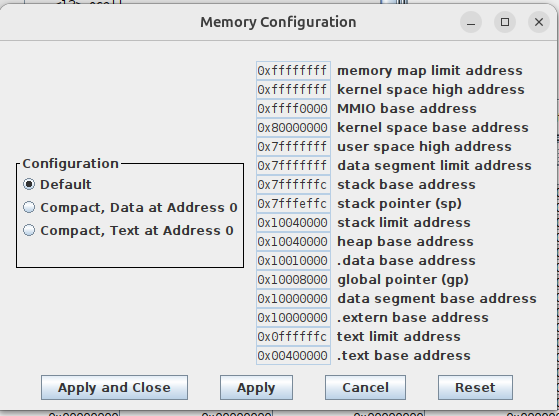
- Memory configuration (check in different machines)
- Memory layout (RISC-V)
- System calls (pactical tasks)
Memory layout in RARS
System calls in RARS
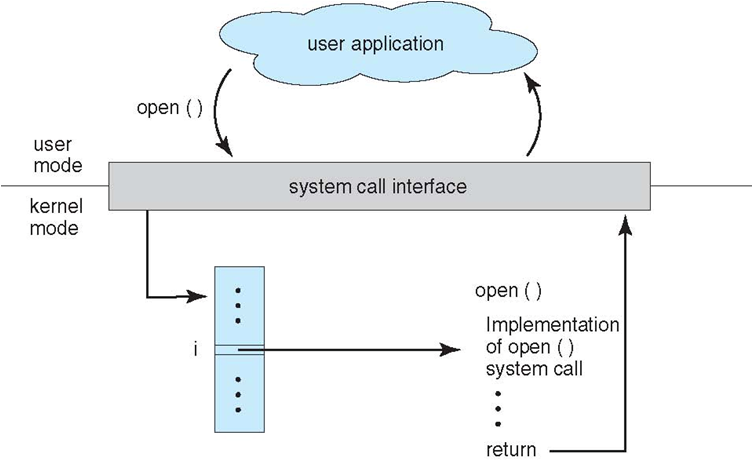
System calls are actions requested by user code and serviced by the environment (operating system). The environment executes the service code in kernel mode (has full access to all resources). This code handles interaction with a specific device and its driver and returns control back to the user.
Standard (provided in all OS) system calls supported by RARS:
-
open (1024): opens a file with the specified path
Input:a0= Null terminated string for the path,a1= flags
Output:a0= the file descriptor or -1 if an error occurred
Supported flags: read-only (0), write-only (1), and write-append (9). The write-only flag creates a file if it does not exist, so it is technically write-create. The write-append flag will start writing at end of an existing file. -
close (57): closes a file
Input:a0= the file descriptor to close
Output: N/A -
read (63): reads from a file descriptor into a buffer
Input:a0= the file descriptor,a1= address of the buffer,a2= maximum length to read.
Output:a0= the length read or -1 if error. -
write (64): writes to a file from a buffer
Input:a0= the file descriptor,a1= the buffer address,a2= the length to write.
Output:a0= the number of characters written. -
sbrk (9): allocates heap memory
Input:a0= amount of memory in bytes
Output:a0= address to the allocated block
Examples
- file_write.s - writing text to a file
- file_read.s - reading text from a file
- heap_alloc.s - allocating memory in the heap
Tasks
- (VM) Consider a virtual memory system that can address a total of 32 GB (
2**35bytes). You have unlimited hard drive space, but are limited to 2 GB (2**31bytes) of semiconductor (physical) memory. Assume that virtual and physical pages are each 4 KB (2**12bytes) in size.- How many bits is the physical address?
- What is the maximum number of virtual pages in the system?
- How many physical pages are in the system?
- How many bits are the virtual and physical page numbers?
- How many page table entries will the page table contain?
- (Syscalls) Write a program that creates a copy of the specified file. Input arguments:
- The name of the source and target files are read from the standard input (use system call 8).
- The buffer to store data being copied is allocated in the heap (use system call 9). The buffer size is specified in standard input.
- Buffers for storing source and target names are also allocated in the heap (their size is 256 bytes).
Homework
NOTE: Need to cover exceptions first to be able to solve this task.
Solve the following tasks and submit them into Ejudge:
References
- Virtual Memory. Section 8.4 in [DDCA].
- Large and Fast: Exploiting Memory Hierarchy. Chapter 5 in [CODR].
- Virtual Memory. Chapted 9 in [CSPP].
- Ulrich Drepper. What Every Programmer Should Know About Memory.
- Translation lookaside buffer (Wikipedia).
- Intel 5-level paging (Wikipedia).
- Intel. 5-Level Paging and 5-Level EPT. White Paper. Revision 1.1. 2017.
- Intel. Intel® 64 and IA-32 Architectures Software Developer’s Manual Volume 3: System Programming Guide. Chapter 4. Paging. 2022.
- Intel. Intel® 64 and IA-32 Architectures Software Developer’s Manual. 2024.
- Lenovo. Introduction to 5-Level Paging in 3rd Gen Intel Xeon Scalable Processors with Linux. 2021.